
Timesheets that fit the day
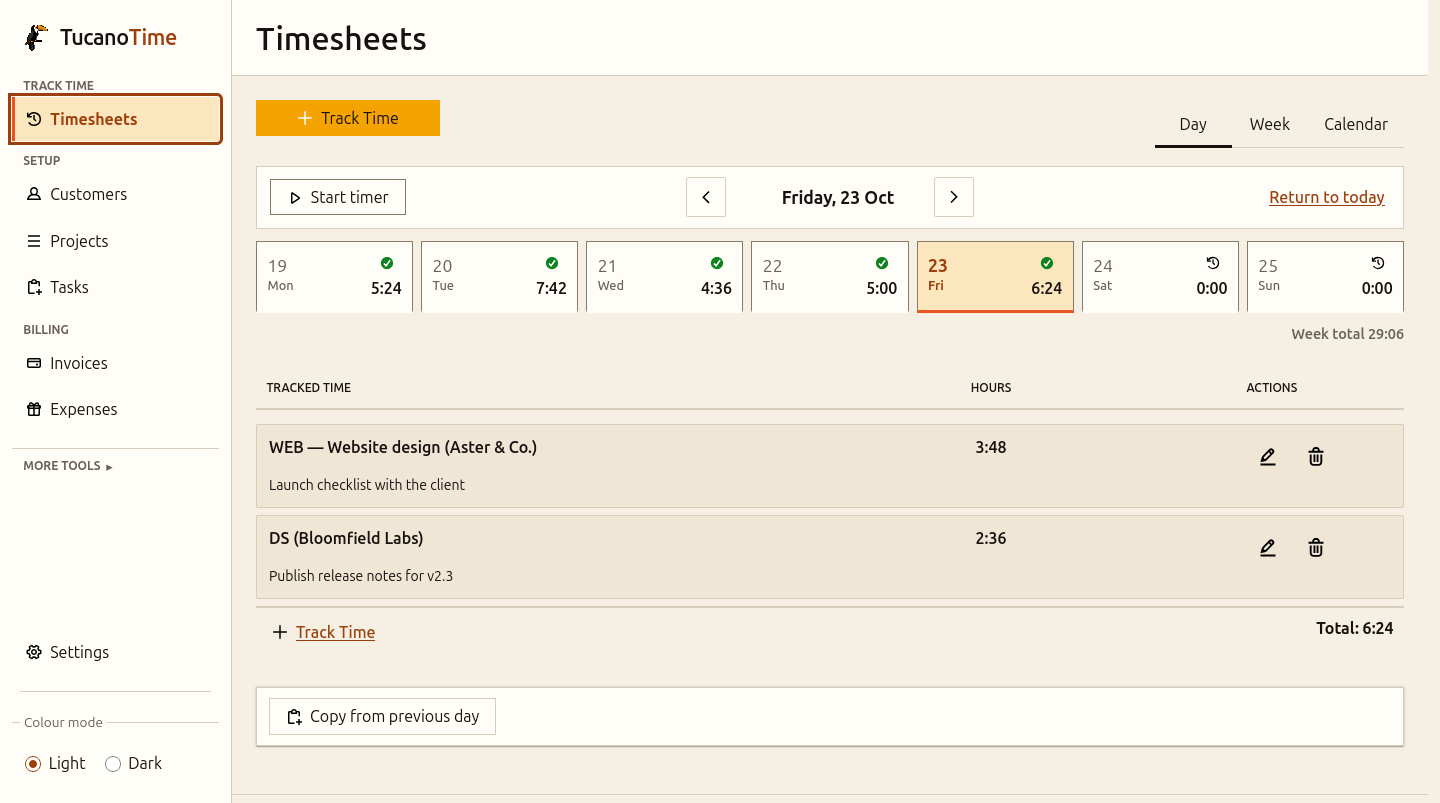
Record a line in seconds, fill a whole week in the grid, or glance at the month. Start the timer when a call runs long; copy yesterday when it doesn't.
Free & open source · Self-hosted
Tucano Time is a calm, fast timesheet and invoicing app for freelancers and small teams. Run it on hardware you control and keep every client, hour and invoice in files you actually own — never in a cloud, and never in an AI.

Data sovereignty
Tucano Time has no cloud account, no usage analytics and no AI anywhere in the product. It talks only to services you explicitly configure, plus an anonymous public exchange-rate feed. Everything else stays on the machine you chose.
Data/
├── customers/       clients, projects, tasks
│   └── 8f3c.../
│       └── projects/
├── entries/          one folder per day
│   └── 2026-10-23/
├── invoices/         documents + PDFs
├── expenses/         costs and receipts
├── users/            accounts and roles
└── audit.log         who changed what
Open it with any editor. Back it up with a zip.
Every record is a JSON document in one folder. No proprietary database, no export request, no support ticket.
There is no model, no tracking pixel and no third-party script. The browser GUI is served by the same binary, and nothing reports back to Tucano Technology.
Export reports as CSV, take the data folder and run the app anywhere Rust runs. You cannot cancel what you never subscribed to.
AGPL-3.0. The source is the product — read it, audit it, patch it, or pay someone you trust to do it.
Currency conversion uses the European Central Bank's daily reference rates — no client data is sent with the request. For a fully air-gapped install, point TUCANO_FX_RATES_FILE at a local copy. Accounting sync only runs if you configure it.
What's inside
Track time the way you actually work, then turn it into invoices without re-keying a thing.
Record a line in seconds, fill a whole week in the grid, or glance at the month. Start the timer when a call runs long; copy yesterday when it doesn't.
Pick a client and a period. Tucano Time drafts the invoice from uninvoiced work, previews the PDF, then issues it with the next number.
Cents and hundredths, never floating point. Each project carries its own currency and rate, and invoice lines freeze the rate they were drafted with.
A clean three-level hierarchy with per-project budgets and profitability, so you can see where the margin actually went.
Log project costs with receipts and categories, mark what is billable, and submit reimbursement claims for approval — all without a shoebox.
Totals by client, project or ISO week, plus invoice trends, budgets and profitability. Export a spreadsheet-safe CSV in one click.
Admins invoice and approve. Members see only their own time and expenses, and submit a week for approval when it is ready.
Argon2id passwords, signed HttpOnly sessions, role checks, optional OIDC single sign-on and an encrypted vault for integration secrets.
A REST API covered by a checked-in OpenAPI contract, with browsable docs at /docs. Import Harvest CSV/ZIP exports, or automate the boring bits.
A look around
No dashboards full of vanity metrics. Just the screens you need to record a day, send an invoice and get paid.
Self-host in minutes
No database to install, no build step, no cloud account. Start the container, open the browser, and the first-run wizard creates your admin, your company and your first client.
A ~41 MB distroless build that runs as an unprivileged user, with every Linux capability dropped.
localhost:8080Create the admin account, name the company, add a client and a project. That is the setup.
The data volume is the whole product. Scheduled ZIP backups are built in, or snapshot the folder yourself.
docker run -d --name tucanotime \
  --read-only --tmpfs /tmp \
  --cap-drop ALL --security-opt no-new-privileges \
  -p 127.0.0.1:8080:8080 \
  -v tucanotime-data:/data \
  -v tucanotime-backups:/Backup \
ghcr.io/tucanotechnology/tucanotime:latestDocker, Compose, an Unraid template — or a single Rust binary on a VPS, NAS or spare laptop.
No account and no telemetry. Outbound calls exist only for integrations you configure, plus the ECB reference-rate feed — replaceable with a local file for air-gapped installs.
Scheduled ZIP backups land in a folder you choose. Restore by extracting into the data directory.
Data is plain JSON with documented migrations. Pull a new image, restart, and your files stay where they were.
The price
Tucano Time is free software under AGPL-3.0. There is no per-seat pricing, no invoice limit, no trial and no credit card. The whole product is in the repository, and it stays that way.
If you modify Tucano Time and offer it as a network service, the AGPL asks you to share those modifications. That is the whole catch.
€0 forever
Built in the open
Tucano Time is built in the open by Tucano Technology, and it gets better when people use it, break it and send the fix back. You do not need to be a Rust expert to help: a reproducible bug report, a clearer sentence in the docs, or a test on your own NAS is real work.
Small, well-scoped tickets labelled for newcomers, with the context you need to start.
Browse issuesTell us what you expected, what happened, and the steps to reproduce it. Screenshots help.
Open an issueA Rust backend, a dependency-free vanilla JS frontend, and contract tests that keep both honest.
Explore the repoSetup guides, operations runbooks and the API reference all live in the repository, next to the code.
Read the docsThe usual Rust workflow. Open a pull request against main; every behaviour change ships with tests.
git clone https://github.com/TucanoTechnology/TucanoTime.git
cd TucanoTime
cargo test --all-targetsQuestions
Still unsure? Open an issue — questions are welcome there too.
Yes. The whole product is AGPL-3.0 open source. There is no paid edition, no seat count and no invoice limit. You pay only for the hardware you run it on.
In a directory you choose — /data in the container, ./Data locally. It is plain JSON plus archived PDFs. Copy it, zip it, inspect it. The app never needs a cloud account.
No. There is no AI feature, no analytics and no telemetry. Network calls happen only for integrations you configure yourself: SMTP, an ICS or Google/Microsoft calendar, OIDC single sign-on, or optional accounting sync. Currency conversion fetches the ECB's anonymous daily reference rates, or reads a local TUCANO_FX_RATES_FILE for a fully offline install. Secrets live in an encrypted local vault.
No. Tucano Time is self-hosted by design: there is no vendor cloud to sign up to and no place for your client list to leak. You run it, you own it.
Docker (or a Rust toolchain), a few megabytes of disk, and a machine that stays on if you want it always available. A NAS, VPS, mini-PC or spare laptop is plenty for a small team.
Yes. Admins manage clients, invoices and approvals; members record only their own time and expenses. Optional OIDC single sign-on can provision accounts from your identity provider.
Tucano Time includes a Harvest importer for CSV/ZIP exports, including original invoice PDFs, with a review step before anything is committed. The API is open if you need a different migration path.
No. There is no Postgres, MySQL or SQLite. Records are JSON documents written atomically, and the data folder is the database. That also makes backup and restore a file operation.
Scheduled ZIP backups are built into Settings → Backup, and the data directory can be copied or snapshotted like any other folder. Archives are never deleted automatically.
Start with a good first issue, open a bug report, improve the docs, or test a release on your own hardware. The repository is github.com/TucanoTechnology/TucanoTime.
Tucano Technology
Tucano Time is the first completed product from Tucano Technology. The Tucano Test tools are also being built in the open, with the same principles: small, self-hostable, and yours to inspect.